

ReportsYou Can Act On
Axion Reports turns your call activity into clear, visual reports—agent performance, call volume, and trends—so you’re not digging through raw call logs.
Want to Learn More?
Why Choose Axion Reports?
Good decisions start with clean data. Axion Reports shows how your team is performing and how calls move through your phone system, from the big picture down to a single call.
Want to Learn More?Reports For Every Question About Your Calls

Performance Reports
Productivity trends across your team.

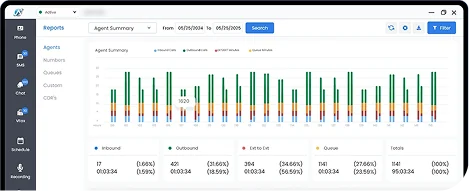
Agent Summary
Totals per agent, such as calls handled and talk time.

Agent Detail
Call-by-call detail for each agent.

Calls By Number
Inbound call stats for each of your phone numbers (DIDs), so staffing follows demand.

Call Detail Records
A log of every call, ready to search and filter.

Filtered Reports
Narrow any report to the agents, dates, or call types you care about.
Advanced Reporting
Go past call counts. With Advanced Analytics, an optional module, you get queue reports and AI analysis of what was said.
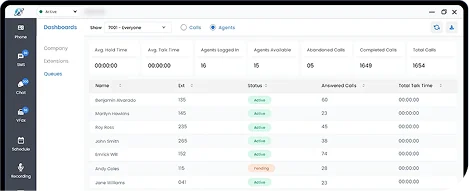
Queue Reports
With Advanced Analytics, wait times and abandonment rates, so you can see where callers are waiting and staff accordingly.
Share Reports
Email a report as a PDF to coworkers or outside addresses.

AI Call Analysis
With Advanced Analytics, an optional module: summaries and sentiment for recorded calls.

Advanced Reports
Detailed reporting on queues and AI analysis for teams that want the trend behind the number.
Tools That Work The Way You Do
Saved Report Presets
Save your report settings and reload them in one click.

Exports
Export report data, and email any report as a PDF.
ReportingWithout The Rebuild
Use date ranges and filters to pull the reports your team relies on, so nobody rebuilds the same spreadsheet every Monday. With Advanced Analytics, use the AI Analysis button on any report for a summary, key insights, and risks.
Want to Learn More?


Calls, team chat, and fax on one cloud communications platform, with texting through Axion Engage.