What Is VFax and How Is It Different from Email?

Key Takeaways
- VFax is cloud based fax that keeps the secure, point to point delivery of traditional fax without the machine.
- Email is convenient, but most cyberattacks and healthcare breaches start there.
- VFax encrypts documents in transit and at rest and logs every action for a complete audit trail.
- Healthcare, legal, and financial teams use VFax when documents must be secure and court admissible.
Remember how email replaced fax? But did you know fax later evolved into something email could never be? In industries where security, compliance, and legal traceability are non negotiable, faxing didn’t just disappear. It transformed into something better than both email and the traditional fax machine. That evolution is called VFax.
VFax keeps the core benefits of traditional faxing, secure point to point delivery, but makes it as easy as sending an email. That might make you wonder: how exactly is VFax different from email?
While email has become the go to for everyday communication, it is still dangerously vulnerable when handling sensitive information. In fact, 91% of cyberattacks begin with phishing emails (Verizon DBIR 2023). That makes email fast, but not at all trustworthy.
In this blog, we’ll break down exactly what VFax is and, more importantly, how it truly differs from email.
What Is VFax?
VFax (short for “Virtual Fax”) is a modern, cloud based alternative to traditional faxing. It delivers the same secure, point to point transmission that made faxing a mainstay in legal and healthcare environments, without the outdated hardware. Instead of relying on phone lines and paper, it uses encrypted internet transmission to send and receive documents securely.
VFax falls under the category of digital fax services or online fax solutions, often integrated with email platforms or secure cloud dashboards. It offers all the benefits of traditional fax, including audit trails, delivery confirmations, and legal admissibility, but with none of the paper jams or dial tones.
How Does VFax Work?
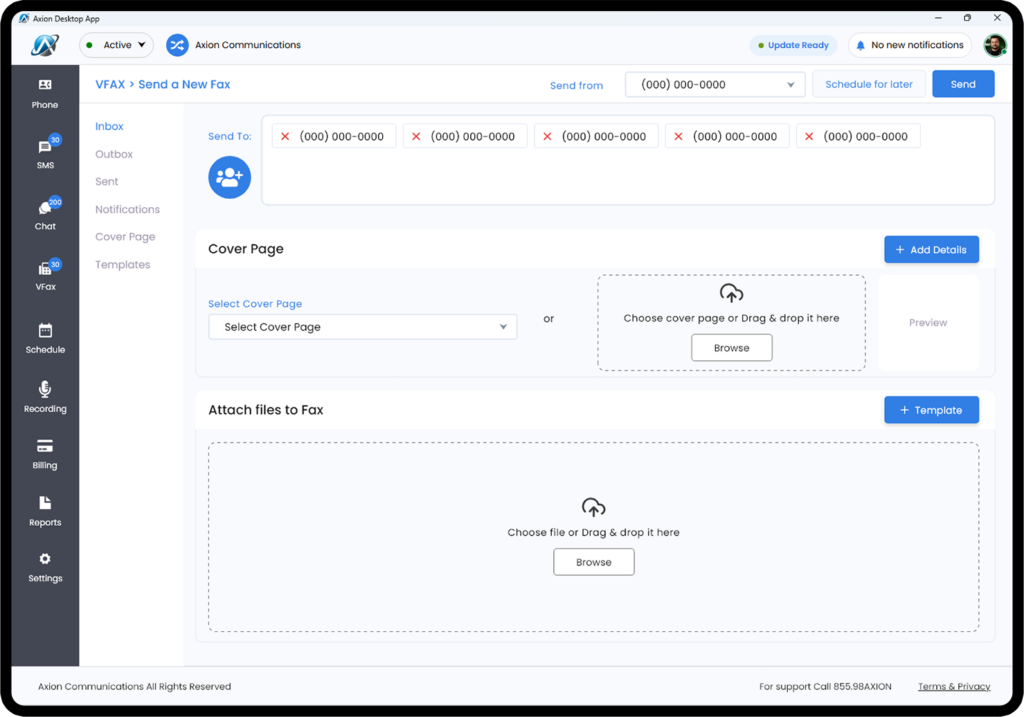
At a basic level, VFax converts a document into a digital file, transmits it securely over the internet, and delivers it to the recipient’s VFax inbox or email address. Users can send faxes from any device (desktop, laptop, or smartphone) through a web portal, an email to fax feature, or a mobile app.
Here’s how a typical VFax process works:
- Upload your document.
- Enter the recipient’s fax number or email.
- Click send.
- The VFax platform encrypts and transmits the document.
- The recipient receives the document through their VFax interface or as a secure attachment.
Many providers also offer fax bridge devices for businesses that still rely on multifunction printers but want to send faxes over IP instead of analog lines.
Key Features That Make VFax Indispensable
VFax isn’t just “fax over email.” It’s a fundamentally different approach to secure document exchange. Here’s what sets it apart:
1. Cloud Based Architecture
Unlike traditional fax machines tied to physical locations, VFax operates entirely in the cloud. This means:
- Remote access from any internet connected device
- Automatic backups of all transmissions
- Scalability for businesses, with no hardware limitations
The impact is huge. A 2023 study found that healthcare providers reduced document processing time by 68% after switching to cloud fax solutions (Journal of Healthcare IT). That’s not just faster. That’s operational transformation.
2. Universal Device Compatibility
VFax works seamlessly across:
- Desktop computers through web portals
- Smartphones through iOS and Android apps
- Tablets through mobile optimized interfaces
- Even legacy fax machines through gateway services
This flexibility explains why 43% of VFax users access the system from multiple devices daily (eFax 2023 User Report).
3. Comprehensive File Support
While traditional fax only handles TIFF, modern VFax supports:
| File Type | Use Case |
|---|---|
| Contracts, reports | |
| JPEG / PNG | Scanned documents |
| DOCX | Editable agreements |
| TIFF | Legacy compatibility |
The ability to handle searchable PDFs is why law firms process 30% faster with VFax than with paper faxing, according to the ABA Tech Survey.
4. Military Grade Security Protocols
Unlike email, where encryption is often optional or left to the user, VFax builds security into every layer of the process by default. Here’s what that looks like in practice:
- Double lock encryption. In transit, every document is wrapped in TLS 1.3, the same protection your bank uses to move money. At rest, it is stored with AES 256, the standard governments use for top secret files.
- Compliance by default. HIPAA keeps health records private. GDPR keeps personal data yours. PCI DSS keeps credit card information safe.
- Secure cloud storage. Tier 3+ data centers, biometric scans just to enter, and the option to auto delete or keep records as long as you need.
- Audit trails and activity logs. Every fax action, whether sending, receiving, viewing, downloading, or deleting, is automatically recorded and time stamped, giving you a complete chain of record.
While email leaves security in the hands of the user, VFax locks it in from the start by encrypting, storing, and tracking every document without relying on human error. According to HIPAA Journal, 92% of healthcare breaches start with email, and 0% of VFax systems were compromised in 2023 (eFax Security Report).
5. VoIP and CRM Integrations
Modern VFax solutions connect with:
- VoIP systems for call logging
- CRM platforms such as Salesforce and HubSpot
- EMR and EHR systems such as Epic and Cerner
The payoff is real. According to Deloitte’s 2023 FinTech Report, financial firms that integrated VFax with their CRMs saw 40% fewer document errors, thanks to automated workflows and better data consistency.
Secure fax, straight from your inbox.
See how Axion VFax keeps sensitive documents encrypted, tracked, and compliant.
VFax vs Email: Side by Side Comparison
While both tools help you share information, only one is truly built for secure, compliant, and legally sound communication. Here’s how VFax and email compare where it really counts:
| Feature | VFax | |
|---|---|---|
| Core Purpose | Secure document transmission | General communication |
| Transmission Method | Sends documents over internet protocols but mimics traditional faxing | Sends messages and attachments through email servers |
| Legal Standing | Court admissible evidence | Often requires additional verification |
| Editability | Documents remain unchanged | Files can be altered after sending |
| Security | Encrypted to prevent interception. Ideal for healthcare and finance | Vulnerable to phishing and unauthorized access without added security |
| Reliability | 99.9% delivery rate | 20% spam or bounce rate |
| Compliance | Built in for regulated industries | Requires third party tools |
| Transmission Path | Point to point encrypted | Multiple server hops |
| Adoption Cost | $10 to $30 per month, no hardware | “Free” but riskier |
Why These Differences Matter in Practice
For Healthcare Providers
- Email risk: a misaddressed email containing PHI triggers mandatory HIPAA reporting.
- VFax solution: automatic encryption and recipient verification prevent breaches.
For Legal Teams
- Email weakness: “the contract was altered after sending” claims in court.
- VFax strength: a digital chain of custody proves document integrity.
For Financial Institutions
- Email danger: CEO fraud scams cost businesses $2.4 billion annually (FBI IC3).
- VFax protection: verified sender identity prevents impersonation.
When Email Is the Right Choice
- Sending non sensitive memos
- Quick team communications
- Sharing public information
When VFax Is the Only Choice
- Healthcare records (HIPAA)
- Legal contracts (court evidence)
- Financial documents (GLBA compliance)
Who Is VFax Best For?
VFax is particularly useful for:
- Industries with strict compliance requirements, such as healthcare, finance, and legal
- Businesses with remote workers or multiple locations
- Small businesses looking for cost effective communication
- Organizations handling sensitive information that requires secure transmission
What Makes Axion's VFax the Best Choice?
Axion’s VFax is built for businesses that need security, efficiency, and ease. Whether you’re handling medical records, financial reports, or legal contracts, Axion VFax gives you the tools to move fast without sacrificing security.
- HIPAA compliant: fully encrypted and secure for healthcare and beyond.
- Simple sending: fax from your email or the portal in a few clicks.
- Real time tracking: know when your fax is received or fails, with no guessing.
- Automated templates: save time with prefilled cover pages.
- Batch sending: send the same document to multiple recipients at once.
- Powerful admin controls: page level tracking, read receipts, and audit logs keep you in control.
- CRM and EMR integrations: direct delivery into Salesforce, Epic, billing systems, and more.
- 24/7 support: our team is always ready to help.
To Sum It Up
Email may be convenient, but when security, compliance, and accountability matter, convenient just isn’t enough. VFax combines the ease of email with the protections of traditional fax, minus the outdated hardware and hassle. Email works fine for casual communication, but critical documents require airtight security, legal validity, and a clear chain of custody.
For healthcare, legal, and financial professionals, or any business handling sensitive data, VFax isn’t just an upgrade. It’s essential.
With strong encryption, built in compliance, and seamless integrations, Axion’s VFax delivers enterprise grade protection without the complexity. Your documents stay secure, trackable, and court admissible by default.
Why take chances with email? Make the switch to Axion VFax today.